Objectif
- Apprendre à créer un AlertDialog avec un TextField dans Flutter.
Présentation
- En Flutter, un
AlertDialogest une boîte de dialogue qui permet d'afficher un message ou des actions pour que l'utilisateur prenne une décision.
- En Flutter, un
Création d'une boîte de dialogue d'alerte
- Le code de base pour créer un widget
AlertDialogavec un seulTextFieldressemble à ceci.
import 'package:flutter/material.dart'; void main() => runApp(MyApp()); class MyApp extends StatelessWidget { @override Widget build(BuildContext context) { return MaterialApp( debugShowCheckedModeBanner: false, theme: ThemeData(primaryColor: Colors.blueAccent), home: TextFieldAlertDialog(), ); } } class TextFieldAlertDialog extends StatelessWidget { final TextEditingController _textFieldController = TextEditingController(); TextFieldAlertDialog({super.key}); _displayDialog(BuildContext context) async { return showDialog( context: context, builder: (context) { return AlertDialog( title: const Text('Quel est ton chiffre porte-bonheur'), content: TextField( controller: _textFieldController, textInputAction: TextInputAction.go, keyboardType: const TextInputType.numberWithOptions(), decoration: const InputDecoration(hintText: "Enter your number"), ), actions:[ TextButton( child: const Text('Submit'), onPressed: () { Navigator.of(context).pop(); }, ) ], ); }); } @override Widget build(BuildContext context) { return Scaffold( appBar: AppBar( title: const Text('Alert Dilaog avec TestFiled'), ), body: Center( child: ElevatedButton( style: ElevatedButton.styleFrom( elevation: 20, // Elevation shadowColor: Colors.amber, // Shadow Color ), onPressed: () => _displayDialog(context), child: const Text( 'Écrivez votre numéro', style: TextStyle(color: Colors.white), ), ), ), ); } } 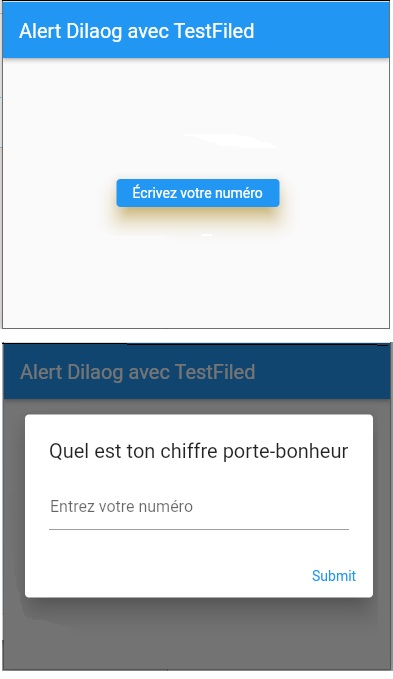
- Le code de base pour créer un widget
Exemple
import 'package:flutter/material.dart'; /////////////////////////////// void main() => runApp(MyApp()); /////////////////////////////// class MyApp extends StatelessWidget { @override Widget build(BuildContext context) { return MaterialApp(theme: ThemeData(), home: MyHomePage()); } } /////////////////////////////// class MyHomePage extends StatefulWidget { Listcards = []; MyHomePage({Key? key}) : super(key: key); @override _MyHomePageState createState() => _MyHomePageState(); } class _MyHomePageState extends State { String? label = ""; @override Widget build(BuildContext context) { return Scaffold( appBar: AppBar( title: const Text("Ma Tâche"), ), body: Center(child: Text(label ?? "")), floatingActionButton: FloatingActionButton( onPressed: () async { var resultLabel = await _showTextInputDialog(context); if (resultLabel != null) { setState(() { label = resultLabel; }); } }, child: const Icon(Icons.add), ), ); } final _textFieldController = TextEditingController(); Future _showTextInputDialog(BuildContext context) async { return showDialog( context: context, builder: (context) { return AlertDialog( title: const Text('À faire'), content: TextField( controller: _textFieldController, decoration: const InputDecoration( hintText: "Veuillez entrer un nom pour la tâche."), ), actions: [ ElevatedButton( child: const Text("Annuler"), onPressed: () => Navigator.pop(context), ), ElevatedButton( child: const Text('OK'), onPressed: () => Navigator.pop(context, _textFieldController.text), ), ], ); }); } }